> For the complete documentation index, see [llms.txt](https://docs.p0.dev/llms.txt). Markdown versions of documentation pages are available by appending `.md` to page URLs; this page is available as [Markdown](https://docs.p0.dev/agentic-access/agentic-gateway/mcp-server.md).
# MCP server
Configure upstream MCP servers behind the P0 AI Gateway to make them available to P0-managed agents under policy.
The **MCP server** component configures an upstream MCP server behind the [AI gateway](/agentic-access/agentic-gateway.md). Agents reach a configured MCP server through the gateway. The gateway authenticates every tool call and checks it against your policy before the call reaches the upstream server.
## Prerequisites
* A registered [Gateway](/agentic-access/agentic-gateway/gateway.md) component, and the gateway deployed in your environment. See [Deploying the gateway](/agentic-access/agentic-gateway/gateway/deploy.md).
## Server definitions
When you add a server, you set its **Definition**: a server predefined by P0, or a **Custom** server you define yourself. For the full list of predefined servers, see the left navigation.
## Authorization models
When you set up a server, you choose an **Access control method**. This decides what calls an agent can make in the upstream system:
* **Native**: The upstream system enforces authorization using its native controls. The gateway passes each call through, and the upstream system's own permissions allow or deny it. Choose this when the system has a deep integration with P0 and the system uses native or WIF credentials.
* **Tool** (Preview): The gateway decides, by tool name. An agent asks for the specific tools it needs. The gateway allows those and blocks every other tool. Choose this for systems without deep integration to P0, or systems that rely on user OAuth credentials.
* **Annotation** (Preview): The gateway decides, by what each tool does. Tools are grouped as read-only, write (non-destructive), or destructive. An agent asks for one or more groups, and the gateway allows any tool in a granted group. A tool with no label is treated as destructive.
To set the access control method when you configure a server, see [Custom](/agentic-access/agentic-gateway/mcp-server/custom.md).
## Add an MCP server
Every MCP server starts with the same steps. The final configuration screen differs by server. When you reach it, continue to the page for the predefined server you chose in the left navigation, or to [Custom](/agentic-access/agentic-gateway/mcp-server/custom.md).
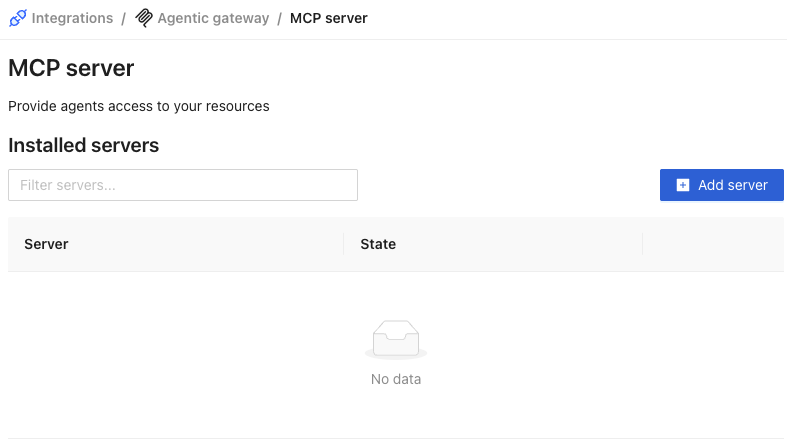
1. Navigate to **Integrations** on [p0.app](https://p0.app) and select **Agentic gateway**, then choose the **MCP server** component.
2. Click **Add server**.
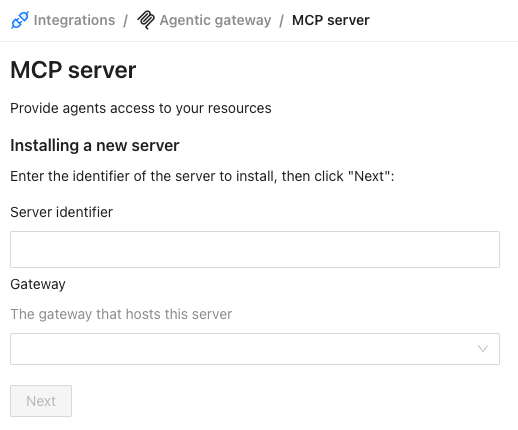
3. Enter the server details, then click **Next**:
* **Server identifier**: a name for this server within P0.
* **Gateway**: the [Gateway](/agentic-access/agentic-gateway/gateway.md) that hosts this server.
4. Set the **Credential source**, which selects how the gateway authenticates to the upstream. Each predefined server's page names the source it needs. The console disables any source the server can't use, with the message "Server is incompatible with ... credentials".
* **AWS IAM federation**: use it for AWS servers, such as [AWS](/agentic-access/agentic-gateway/mcp-server/aws.md) and [PostgreSQL on AWS RDS](/agentic-access/agentic-gateway/mcp-server/rds-postgres.md). Then select an [AWS OIDC](/agentic-access/credential-sources/aws-oidc.md) identity as the **Federation provider**.
* **GCP WIF federation**: use it for the Google Cloud servers in [GCP](/agentic-access/agentic-gateway/mcp-server/gcp.md). Then select a [GCP Workload Identity Federation](/agentic-access/credential-sources/gcp-wif.md) identity as the **Federation provider**.
* **Native credentials**: use it when the upstream accepts a token that the gateway signs. See [Custom](/agentic-access/agentic-gateway/mcp-server/custom.md#native-credentials).
* **OAuth** (Preview): use it when each user signs in to the upstream with their own account, as with [SaaS](/agentic-access/agentic-gateway/mcp-server/saas.md). See [Custom](/agentic-access/agentic-gateway/mcp-server/custom.md#oauth).
* **Vaulted credential** (Preview): use it for [PagerDuty](/agentic-access/agentic-gateway/mcp-server/pagerduty.md), [Datadog](/agentic-access/agentic-gateway/mcp-server/datadog.md), [ServiceNow](/agentic-access/agentic-gateway/mcp-server/servicenow.md), and GitHub. For each grant, P0 stores a token in your secret manager, and the gateway calls the upstream with it.
* **Token exchange (RFC 8693)** (Preview): use it for [Salesforce](/agentic-access/agentic-gateway/mcp-server/salesforce.md). The gateway exchanges its own token for one the upstream accepts.
* **Service account impersonation**: use it for [Google Drive](/agentic-access/agentic-gateway/mcp-server/google-drive.md). P0 provisions an identity for each grant, and the gateway acts as that identity.
5. Set the **Definition**, which selects what the server exposes:
* **P0**: a predefined server. Follow its page in the left navigation.
* **Custom**: a server you define yourself. See [Custom](/agentic-access/agentic-gateway/mcp-server/custom.md).
### Configure with Terraform
Use the P0 Terraform provider to configure an MCP server outside the console. The [`p0_ai_gateway_server`](https://registry.terraform.io/providers/p0-security/p0/latest/docs/resources/ai_gateway_server) resource takes the hosting gateway's `id`, the server's own `id`, a `definition` (`p0` or `custom`), and a `credential`. These are the same choices as the console fields.
Set `credential.type` to the value for your credential source:
| Credential source | `credential.type` |
| ----------------------------- | ----------------- |
| AWS IAM federation | `aws` |
| GCP WIF federation | `gcp` |
| Native credentials | `native` |
| OAuth | `oauth` |
| Vaulted credential | `vault` |
| Token exchange (RFC 8693) | `generic` |
| Service account impersonation | `impersonation` |
For `aws` and `gcp`, also set `credential.provider` to the `id` of a `p0_aws_oidc_identity` or `p0_gcp_wif_identity` resource. For `oauth`, also set `credential.grant`.
## Related docs
* [Connect an MCP client](/agentic-access/using-the-gateway/connect-an-mcp-client.md): Learn how to register a client and connect an agent to an MCP server through the gateway.
* [Use MCP servers with Claude Code](/agentic-access/using-the-gateway/using-mcp-servers.md): Connect Claude Code to MCP servers managed by P0.