> For the complete documentation index, see [llms.txt](https://docs.p0.dev/llms.txt). Markdown versions of documentation pages are available by appending `.md` to page URLs; this page is available as [Markdown](https://docs.p0.dev/agentic-access/using-the-gateway/connect-an-mcp-client.md).
# Connect an MCP client
Register an MCP client and connect it to an MCP server configured behind the P0 AI Gateway.
This guide covers the path from a configured P0 AI Gateway to a working tool call. Configure an MCP server behind the gateway, register a client so your agent can authenticate, and connect to the server from Python.
## 1. Overview
### What this enables
Once you finish this guide, an agent you write can call the tools of an upstream MCP server through the gateway. The gateway sits in the data path. It authenticates the caller on every tool call, checks the call against the policies you set in P0, forwards it to the upstream server, and logs it. Your agent never holds upstream credentials, and no tool call reaches the upstream server unauthenticated.
### Prerequisites
* A P0 account at [p0.app](https://p0.app/).
* A deployed P0 AI Gateway. See [Deploying the gateway](/agentic-access/agentic-gateway/gateway/deploy.md).
* A configured [Gateway](/agentic-access/agentic-gateway/gateway.md) component in P0. The gateway must appear with the state **Installed** before an MCP server can point at it.
* Python 3.10 or later, for the client example.
## 2. Configure the MCP server
An MCP server configured behind the gateway becomes available to P0-managed agents across your organization.
### Configure in the console
1. Navigate to **Integrations** on [p0.app](https://p0.app), select **Agentic gateway**, then choose the **MCP server** component.
2. Click **Add server**.
3. Enter the server details, then click **Next**:
* **Server identifier**: a name for this server within P0. This value also becomes the server's ID in the gateway URL, so note it. Step 4 refers to it as `SERVER_ID`.
* **Gateway**: the [Gateway](/agentic-access/agentic-gateway/gateway.md) that hosts this server.
4. Set the **Credential source**, which selects how the gateway authenticates to the upstream:
* [AWS OIDC](/agentic-access/credential-sources/aws-oidc.md)
* [GCP Workload Identity Federation](/agentic-access/credential-sources/gcp-wif.md)
* **OAuth**
5. Set the **Definition**, which selects what the server actually exposes:
* **P0**, a predefined definition. Continue to [AWS](/agentic-access/agentic-gateway/mcp-server/aws.md) or [GCP](/agentic-access/agentic-gateway/mcp-server/gcp.md) for the fields specific to each.
* **Custom**, a server you define yourself. See [Custom](/agentic-access/agentic-gateway/mcp-server/custom.md).
For the full walkthrough of this component, including screenshots of each screen, see [MCP server](/agentic-access/agentic-gateway/mcp-server.md).
### Configure with Terraform
Use the P0 Terraform provider to configure an MCP server outside the console. The [`p0_ai_gateway_server`](https://registry.terraform.io/providers/p0-security/p0/latest/docs/resources/ai_gateway_server) resource takes the hosting gateway's `id`, the server's own `id`, a `definition` (`p0` or `custom`), and a `credential` source (`aws`, `gcp`, or `oauth`), the same choices as the console fields above.
* Registering the gateway itself is a separate step, covered in [Gateway](/agentic-access/agentic-gateway/gateway.md) for the console walkthrough.
* You can use Terraform to register and configure the Gateway component in P0 using the P0 Terraform provider [`p0_ai_gateway`](https://registry.terraform.io/providers/p0-security/p0/latest/docs/resources/ai_gateway)
### Inspect the configured servers
Read back the configured servers, which is the fastest way to confirm what the gateway serves:
```http
GET /o/{orgId}/agentic/servers
GET /o/{orgId}/agentic/servers/{serverId}
```
* `{orgId}`: your P0 tenant slug, the same value that appears in console URLs at `p0.app/o/{orgId}/...`.
These read calls accept a bearer token in the `Authorization` header. See [Authenticating with the P0 API](/p0-api/authenticating-with-the-p0-api.md) for how to get one:
```bash
curl -H "Authorization: Bearer $P0_TOKEN" \
https://api.p0.app/o/$P0_TENANT/agentic/servers
```
Registering a client is different: it requires a user token, covered in [#id-3.-register-the-client](#id-3.-register-the-client "mention").
### What P0 creates after configuration
* The server becomes reachable at `{gatewayUrl}/mcps/{serverId}`, and this URL is where your client connects. `GET /o/{orgId}/agentic/servers` returns the exact `url` for each server in its JSON body.
* The gateway periodically syncs its configuration from P0 and reconciles the set of servers it hosts, adding newly configured servers and removing ones no longer configured. When a new server is installed, the gateway performs an ad-hoc sync so the server becomes available immediately.
* The server's tool catalog is synced to P0, which allows P0 to understand the tools exposed by the MCP server.
## 3. Register the client
A client is the identity your agent presents to the gateway. Registering one yields a client ID and a client secret.
This is the user-delegated path: the credentials identify your *application*, and a person still signs in through P0, so every tool call carries both the user's identity and the agent's. Use it for agents that act on behalf of a person. For an unattended workload with no human in the loop, use [JWT-SVID](/agentic-access/using-the-gateway/spiffe-svid.md).
### Register in the console
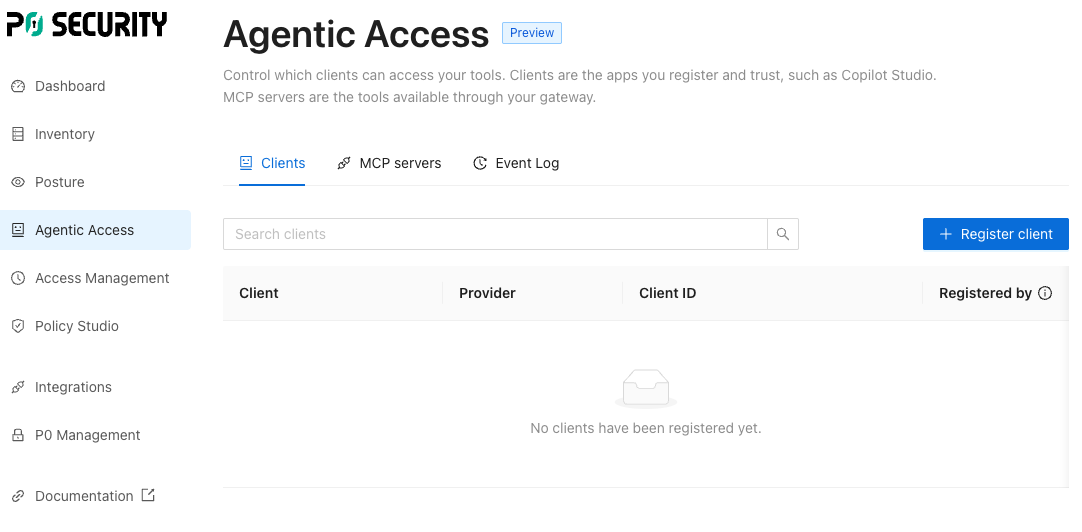
1. Navigate to the **Agentic Access** page on [p0.app](https://p0.app) and open the Clients view.
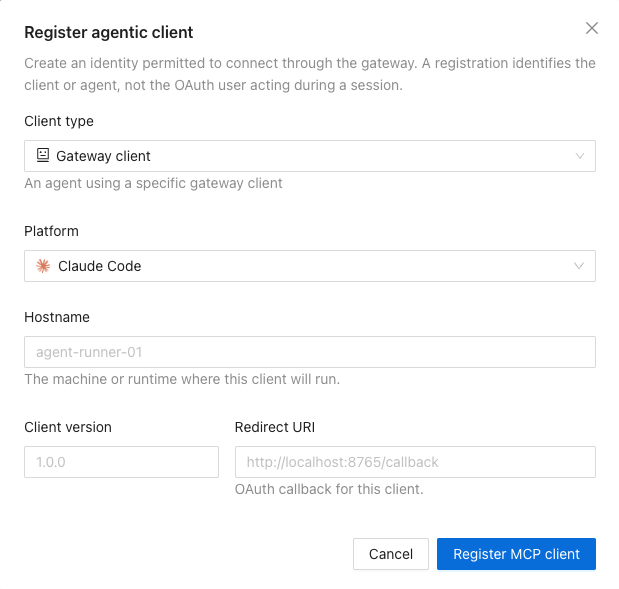
2. Register client, supplying its platform and redirect URI.
* For Claude Code, the redirect URI depends on how you add the server. [p0 claude mcp add](/p0-cli/p0-commands-and-usage/p0-claude-mcp-add.md) registers the client for you and sets the callback port, which defaults to `52566`. Adding the server yourself with `claude mcp add` instead leaves Claude Code to pick the port at run time. Either way you don't have to pin it: P0 ignores the port when matching a plain `http` loopback redirect URI like this one, as described under [#where-the-authorization-code-arrives](#where-the-authorization-code-arrives "mention").
* For a custom agent application, provide the callback URL exposed by your application's OAuth implementation.
3. Copy the **client ID** and **client secret**.
{% hint style="danger" %}
The client secret is shown once, at registration. Store it securely before leaving the page. If you lose it, register a new client.
{% endhint %}
### Register through the API
To register a client outside the console, `POST` to the clients endpoint. Set `type` to `client_credential_post` for the confidential client this guide uses. The response contains the created client, including its `secret`, which P0 returns only once.
Registration requires a user token: a bearer token from a session signed in as a P0 user. The [Authenticating with the P0 API](/p0-api/authenticating-with-the-p0-api.md#p0-cli-token) method in the authentication guide prints one from your login session.
```bash
curl -X POST \
-H "Authorization: Bearer $P0_USER_TOKEN" \
-H "Content-Type: application/json" \
-d '{
"type": "client_credential_post",
"platform": "custom",
"hostname": "my-agent.internal",
"redirectUri": "http://localhost:8080/callback",
"version": "1.0.0"
}' \
https://api.p0.app/o/$P0_TENANT/agentic/clients
```
For the request and response fields, the federated-identity variant, authentication for each endpoint, and the endpoints to list and update registered clients, see the [Agentic client registration API](/agentic-access/using-the-gateway/connect-an-mcp-client/client-registration-api.md) reference.
## 4. Connect from Python
This example uses the [MCP Python SDK](https://github.com/modelcontextprotocol/python-sdk).
```bash
pip install mcp
```
### Where each value goes
| Value | Where it comes from | Used as |
| ---------------------------- | ------------------------------------------------------------------------------------------------------------------------------------------------------- | --------------------------- |
| `GATEWAY_URL` | The **Agentic gateway URL** you set on the [Gateway](/agentic-access/agentic-gateway/gateway.md) component | Base of the server URL |
| `SERVER_ID` | The **Server identifier** from step 2 | Path segment under `/mcps/` |
| `CLIENT_ID`, `CLIENT_SECRET` | Step 3 | Client authentication |
| `REDIRECT_URI` | Step 3. See [#where-the-authorization-code-arrives](#where-the-authorization-code-arrives "mention") for how it is matched against the registered value | Where sign-in returns |
Your client connects to `{GATEWAY_URL}/mcps/{SERVER_ID}`. The access token must use that same URL as its audience. Copy the exact URL from the `url` field that `GET /o/{orgId}/agentic/servers` returns for your server.
### Where the authorization code arrives
`REDIRECT_URI` is where P0 sends the browser once the user signs in, with the authorization code on the query string. For an agent that runs locally, nothing is listening at that address until your process opens the port. This is the same loopback pattern Claude Code uses.
P0 matches the redirect URI you send against the one you registered in step 3:
* A non-loopback URI is compared as an exact string.
* A loopback URI (`http` on `localhost`, `127.x`, or `[::1]`) is matched with the port ignored, so the dynamically assigned callback port from [#id-3.-register-the-client](#id-3.-register-the-client "mention") still matches.
* A registered root path (`/`) permits any callback path. A registered non-root path must match exactly.
* The query string must match.
Your code is responsible for one thing: receiving that authorization code and handing it to the SDK. `OAuthClientProvider` does the rest, exchanging the code for an access token and attaching the token to every request, so your code never handles the token itself.
### The client
{% hint style="warning" %}
This example shows how to configure an MCP client using a P0-registered client ID and client secret. Replace the example variables with your client details.
The `CallbackServer` below is the loopback listener for a locally run agent. If your agent runs behind a web server instead, register that server's callback route in step 3 instead of a `localhost` URI. Have the route pass the authorization code to `callback_handler` instead of running this listener.
{% endhint %}
{% hint style="info" %}
The snippet below targets MCP Python SDK **v2**, whose import paths differ from v1. In v2 the transport helper is `streamable_http_client`, not `streamablehttp_client`, and `callback_handler` returns an `AuthorizationCodeResult` rather than v1's `(code, state)` tuple. Check your installed version with `pip show mcp`.
{% endhint %}
```python
import asyncio
import queue
import threading
import urllib.parse
import webbrowser
from http.server import BaseHTTPRequestHandler, ThreadingHTTPServer
from mcp import ClientSession
from mcp.client.auth import AuthorizationCodeResult, OAuthClientProvider, TokenStorage
from mcp.client.streamable_http import create_mcp_http_client, streamable_http_client
from mcp.shared.auth import OAuthClientInformationFull, OAuthClientMetadata, OAuthToken
GATEWAY_URL = "https://gateway.example.com"
SERVER_ID = "gcp-compute"
CLIENT_ID = ""
CLIENT_SECRET = ""
REDIRECT_URI = "http://localhost:8080/callback"
SERVER_URL = f"{GATEWAY_URL}/mcps/{SERVER_ID}"
class P0ClientStorage(TokenStorage):
"""Supplies the client P0 issued in step 3.
Returning client info from get_client_info stops the SDK from registering a
client of its own, so the gateway sees the client you registered with P0.
Tokens are held in memory here; persist them to reuse a session.
"""
def __init__(self) -> None:
self._tokens: OAuthToken | None = None
async def get_client_info(self) -> OAuthClientInformationFull | None:
return OAuthClientInformationFull(
client_id=CLIENT_ID,
client_secret=CLIENT_SECRET,
redirect_uris=[REDIRECT_URI],
token_endpoint_auth_method="client_secret_post",
grant_types=["authorization_code", "refresh_token"],
response_types=["code"],
)
async def set_client_info(self, client_info: OAuthClientInformationFull) -> None:
return None
async def get_tokens(self) -> OAuthToken | None:
return self._tokens
async def set_tokens(self, tokens: OAuthToken) -> None:
self._tokens = tokens
class CallbackServer:
"""Listens on REDIRECT_URI for the authorization response from P0.
P0 redirects the browser here after sign-in with the authorization code on
the query string. The code is handed to OAuthClientProvider, which exchanges
it for an access token; this class never sees the token.
"""
def __init__(self, redirect_uri: str) -> None:
url = urllib.parse.urlparse(redirect_uri)
self._path = url.path
self._results: queue.Queue[AuthorizationCodeResult] = queue.Queue()
outer = self
class Handler(BaseHTTPRequestHandler):
def log_message(self, *args: object) -> None:
pass
def do_GET(self) -> None:
path, _, query = self.path.partition("?")
if path != outer._path:
self.send_response(404)
self.send_header("Content-Length", "0")
self.end_headers()
return
params = urllib.parse.parse_qs(query)
body = b"Authorization complete. You can close this tab."
self.send_response(200)
self.send_header("Content-Type", "text/plain")
self.send_header("Content-Length", str(len(body)))
self.end_headers()
self.wfile.write(body)
outer._results.put(
AuthorizationCodeResult(
code=params.get("code", [""])[0],
state=params.get("state", [None])[0],
iss=params.get("iss", [None])[0],
)
)
self._server = ThreadingHTTPServer(
(url.hostname or "localhost", url.port or 80), Handler
)
def __enter__(self) -> "CallbackServer":
threading.Thread(target=self._server.serve_forever, daemon=True).start()
return self
def __exit__(self, *exc: object) -> None:
self._server.shutdown()
self._server.server_close()
async def wait(self) -> AuthorizationCodeResult:
"""Blocks until P0 redirects the browser to REDIRECT_URI."""
return await asyncio.to_thread(self._results.get)
async def main() -> None:
with CallbackServer(REDIRECT_URI) as callback_server:
async def redirect_handler(authorization_url: str) -> None:
"""Sends the user to P0 to sign in."""
print("open this URL to sign in:", authorization_url)
webbrowser.open(authorization_url)
auth = OAuthClientProvider(
server_url=SERVER_URL,
client_metadata=OAuthClientMetadata(
client_name="my-agent",
redirect_uris=[REDIRECT_URI],
grant_types=["authorization_code", "refresh_token"],
response_types=["code"],
token_endpoint_auth_method="client_secret_post",
),
storage=P0ClientStorage(),
redirect_handler=redirect_handler,
callback_handler=callback_server.wait,
)
async with create_mcp_http_client(auth=auth) as http_client:
async with streamable_http_client(SERVER_URL, http_client=http_client) as (
read,
write,
):
async with ClientSession(read, write) as session:
await session.initialize()
tools = await session.list_tools()
print("tools:", [tool.name for tool in tools.tools])
asyncio.run(main())
```
## 5. Verify the connection
1. **Confirm the session opened.** `session.initialize()` returns without raising.
2. **Confirm that the gateway serves the server.** Call `list_tools()` and confirm the server's tools come back. For a P0 predefined server you also see the access tools `access`, `check`, `list`, and `relinquish`. An empty tool list means the gateway has no definition for this server. See Troubleshooting below.
```python
tools = await session.list_tools()
print("tools:", [tool.name for tool in tools.tools])
```
3. **Confirm P0 saw it.** The `list_tools` call appears in the gateway's activity, which you can read with `GET /o/{orgId}/agentic/activity`. The gateway also emits an `auth.verified` audit event recording the subject and audience of the token it accepted.
{% hint style="info" %}
Calling a tool, rather than listing tools, additionally requires an agentic access policy that permits the call. See [Agentic access policies](/policy-studio/policy-studio/agentic-access-policies.md). Listing tools needs no policy.
{% endhint %}
## 6. Troubleshooting
| Symptom | Cause | Fix |
| --------------------------------------------------------------------------------------------- | ---------------------------------------------------------------------------------- | ---------------------------------------------------------------------------------------------------------------------------------------------------------------------------------------------------------------------------------------------------------------------------------------------------------------------------- |
| `404` on the MCP endpoint | Wrong gateway URL, or `SERVER_ID` does not match a configured server | Copy the `url` field for your server from `GET /o/{orgId}/agentic/servers`. The gateway resolves the server before it authenticates, so an unknown server answers `404` and never returns a `401`. |
| Tool list is empty, no error | The gateway has no definition for this server | Installing a server triggers an immediate sync, so this is rarely a timing problem. Confirm the server appears in `GET /o/{orgId}/agentic/servers` and that `SERVER_ID` matches its identifier exactly. |
| `401` with `WWW-Authenticate: Bearer` | No token, or the token failed verification | Confirm your client obtained a token, and that its audience is `{gatewayUrl}/mcps/{serverId}`. |
| `invalid_client` at the token endpoint | Client ID or secret wrong, or client disabled | Check the client in `GET /o/{orgId}/agentic/clients`. A client's `status` must be `active`. |
| Sign-in returns a redirect URI mismatch | The `redirectUri` sent does not match the registered one under P0's matching rules | A non-loopback URI must match exactly. Loopback matching ignores the port. See [#where-the-authorization-code-arrives](#where-the-authorization-code-arrives "mention"). |
| A `2xx` response that is not JSON | You are talking to an SSO proxy or an app front end, not the gateway | Point at the gateway host, not the P0 console or P0 API. A proxy answers `200` with an HTML login page. |
| Token rejected with an audience error | The audience is the bare gateway host instead of the per-server URL | The token audience must be `{gatewayUrl}/mcps/{serverId}`. See the audience section in [JWT-SVID](/agentic-access/using-the-gateway/spiffe-svid.md). |
| `list` returns no values, no error | The project or account has no resources that both exist and that you can request. | Create at least one resource of that type and an access policy that allows you to request it, then call `list` again. See [Configure your first access policy](/getting-started/configure-your-first-access-policy.md). This is different from an empty tool list, which means the gateway has no definition for the server. |
| The connection hangs, then times out | The gateway's hostname resolves in DNS, but nothing answers at that address | Check [#the-hostname-does-not-connect](#the-hostname-does-not-connect "mention"). |
| The connection resets during the TLS handshake, or the certificate doesn't match the hostname | The hostname resolves to a load balancer for a different gateway install | Check [#the-hostname-does-not-connect](#the-hostname-does-not-connect "mention"). |
### The hostname does not connect
Both failures above happen before the gateway ever answers, so there's no status code to look up. In Claude Code, the client reports that it is authenticating and no browser window ever opens, since it fetches the gateway's OAuth metadata before sign-in can start. It reads as a sign-in problem, but no sign-in has been attempted yet.
The cause is the same in both cases: the hostname's DNS record doesn't point at this gateway's load balancer. The record is written once, from the load balancer address entered during install, and nothing updates it afterward. So it goes stale if the gateway is reinstalled or its load balancer is recreated, since that gets a new address from your cloud provider. Compare the DNS answer against the address the gateway itself reports:
```bash
dig
kubectl -n get gateway agentic-gateway -o jsonpath='{.status.addresses[0].value}'
```
If they disagree, that's the fault. On a P0-hosted domain, P0 owns the record: re-enter the current address in the console and P0 rewrites it. On a self-hosted domain the record is yours, so update it at your own DNS provider. See [Gateway](/agentic-access/agentic-gateway/gateway.md#the-install-fails-with-a-reachability-error) for where that address is set at install time.
To confirm the gateway itself is healthy while the DNS record is still wrong, address it directly:
```bash
curl -sv https:///.well-known/oauth-authorization-server
curl --resolve :443: https:///.well-known/oauth-authorization-server
```
The second command bypasses DNS entirely. `--resolve` takes an IP address, so if your cloud provider gave you a hostname for the load balancer, resolve that hostname first with `dig +short ` and pass the address it returns. A `200` response with OAuth metadata there, alongside a hanging or reset connection without `--resolve`, confirms the gateway is fine and the record is the problem.
## Related
* [Agentic client registration API](/agentic-access/using-the-gateway/connect-an-mcp-client/client-registration-api.md): the API reference for registering, listing, and updating clients.
* [JWT-SVID](/agentic-access/using-the-gateway/spiffe-svid.md): connect an unattended workload instead of a user-delegated client.
* [MCP server](/agentic-access/agentic-gateway/mcp-server.md): the full component walkthrough, with screenshots.
* [Gateway](/agentic-access/agentic-gateway/gateway.md): register a gateway deployment with P0.
* [Use MCP servers with Claude Code](/agentic-access/using-the-gateway/using-mcp-servers.md): connect Claude Code instead of a client you wrote.
* [Agentic access policies](/policy-studio/policy-studio/agentic-access-policies.md): govern what agents may do.