> For the complete documentation index, see [llms.txt](https://docs.p0.dev/llms.txt). Markdown versions of documentation pages are available by appending `.md` to page URLs; this page is available as [Markdown](https://docs.p0.dev/agentic-access/using-the-gateway/event-log.md).
# Event log
Review the MCP tool calls and A2A agent calls the P0 AI Gateway observed, filter and export them, and open the access request behind each one.
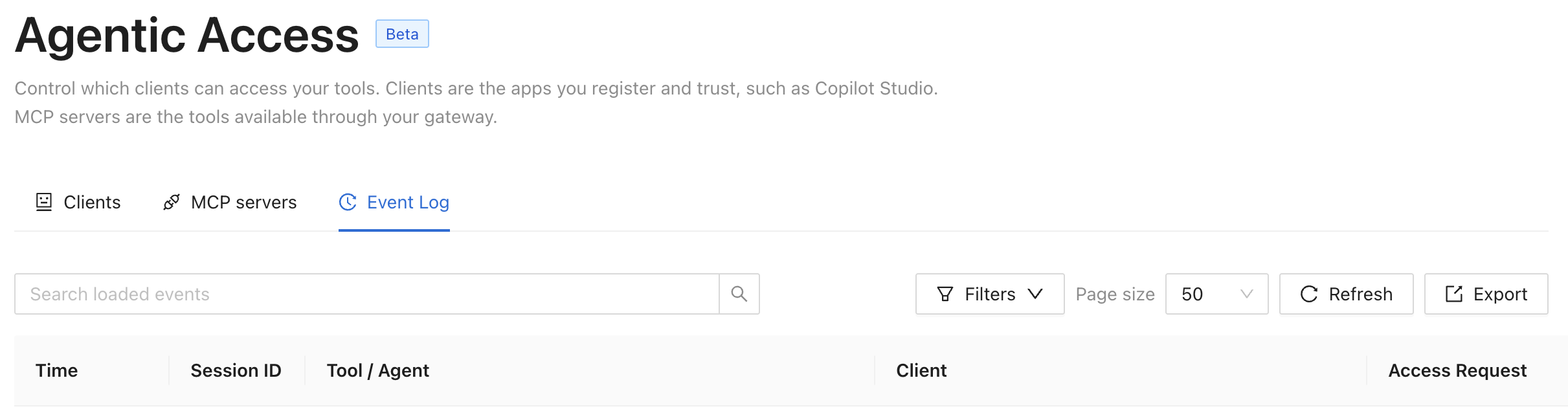
The **Event log** tab on the **Agentic Access** page lists the calls your registered [Gateway](/agentic-access/agentic-gateway/gateway.md) observed: MCP tool calls, A2A agent calls, and any call the gateway rejected. Each row records which client called which tool or agent, on which MCP server, as which principal, and under which access request ([Requesting access](/agentic-access/using-the-gateway/requesting-access.md)). Use it to answer who did what through the gateway, trace a single agent session end to end, export the evidence for a compliance review, and recommend an access policy for a call that shouldn't have been allowed.
P0 reads this activity from your gateway's configured [Log provider](/agentic-access/agentic-gateway/log-provider.md) — your own Google Cloud Logging project, or VictoriaLogs queried through the gateway itself — when you open the tab. Your gateway does not forward calls to P0, and P0 does not retain a copy of them: the logs stay in your own system, subject to your own retention policy.
## Prerequisites
* A registered [Gateway](/agentic-access/agentic-gateway/gateway.md) with a [Log provider](/agentic-access/agentic-gateway/log-provider.md) configured. A gateway with no log provider configured contributes no activity, and the tab stays empty.
* For a Google Cloud Logging provider, `roles/logging.viewer` granted to P0's platform service account on the log project, as in [/pages/KyM0Bvvo9iYIAsNlyi8h#id-3.-let-p0-read-the-project](https://docs.p0.dev/agentic-access/using-the-gateway/pages/KyM0Bvvo9iYIAsNlyi8h#id-3.-let-p0-read-the-project "mention"), or a custom role that includes `logging.logEntries.list`. Without this grant, the tab reports that the event log couldn't be loaded.
* The Owner or Security Reviewer role. The tab requires the `agentic.log.read` permission, held only by Owners and Security Reviewers. The Agentic Access page itself is open to Owners, Security Reviewers, Assessment Users, and Assessment Viewers, but Assessment Users and Assessment Viewers lack `agentic.log.read` and see a permission error when they open the Event log tab.
## View activity
1. Navigate to **Agentic Access** on [p0.app](https://p0.app), then select the **Event log** tab. The tab opens on the previous seven days.
2. Review the calls. The table shows the most recent call first:
| Column | Shows |
| -------------- | -------------------------------------------------------------------------------------------------------------------------------------------------------------------------- |
| Time | When the call happened. |
| Session ID | The first segment of the agent session identifier. |
| Tool / Agent | The MCP tool or A2A agent called, the server or bridge it went to, and a protocol tag marking the row MCP or A2A. A red **Blocked** tag marks a call the gateway rejected. |
| Client | The registered client that made the call. P0 shows the client's display name when it has one, with the client ID beneath it. |
| Access Request | The access request the call ran under, linked to its detail page. |
3. Select a row to open its details, including the full request arguments, the delegation chain behind the call, and, for a gateway with trace propagation enabled, the correlated trace and span IDs. The delegation chain lists every agent in the chain, starting with the final agent that made the call and running back to the user or agent that originated it.
4. Select **Refresh** to reload the newest calls, or **Load more events** to page through older calls. Use the page size selector to choose 50 or 100 calls per page. With a VictoriaLogs provider, the table shows only the most recent page and **Load more events** doesn't appear. To reach older calls, set a narrower time range or add filters.
The tab records invocations only: MCP `tools/call` messages and A2A `message/send` or `message/stream` calls. Session setup, tool discovery, and responses are in the gateway application logs.
## Filters
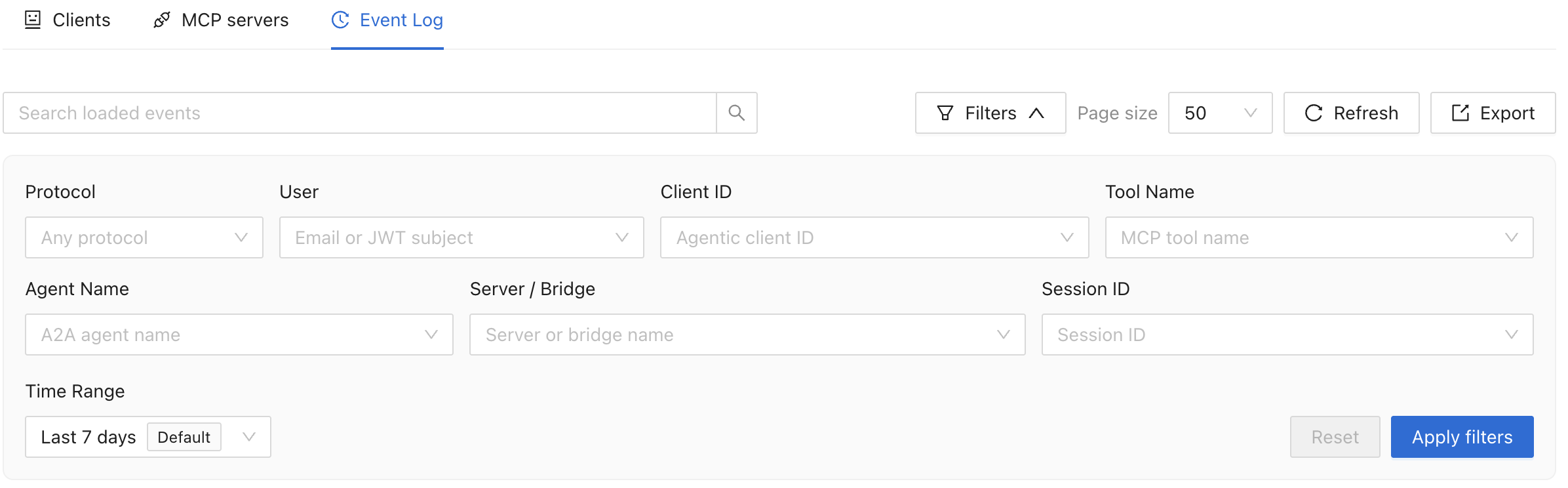
Click **Filters** to narrow the log by:
* **User**: the caller's email or JWT subject.
* **Client ID**
* **Tool Name**: the MCP tool called.
* **Agent Name**: the A2A agent called.
* **Server / Bridge**: the MCP server or A2A bridge name.
* **Session ID**
* **Protocol**: MCP or A2A.
* **Time Range**: a lookback preset (last 24 hours, 7 days, 30 days, 90 days, or year) or a custom range. The default is the last 7 days.
Applied filters are part of the page's URL, so a filtered view is a link you can share or bookmark.
## Search loaded events
The **Search loaded events** box narrows the rows already loaded into the table. It doesn't query the gateway again, so it only searches what you've loaded so far. To search calls outside that window, add filters or load more events first.
## Trace an agent session
The Event log links a call to its authorization in both directions:
* From a call, select its **Access Request** to see who requested the underlying access, who approved it, and when it expires.
* From a session, filter on **Session ID** to see every tool the agent called during that session.
For a call the gateway traced, its details carry a trace ID and span ID. Copy the trace ID to follow the same call through your own OpenTelemetry backend or Cloud Trace. A call that arrived without trace context shows the log entry ID alone.
## Recommend a policy from a call
Users with the Owner role can turn an MCP call into a policy — Policy Studio's new-policy route requires the Owner role, not just Security Reviewer. On a row with an access request, click **Review Recommended Policy** to open Policy Studio's new-policy form, prefilled with the call's client as the requestor and the granted service and access type as the resource. For example, a call against AWS Admin Access prefills a policy named **AWS Admin Access**, with no approval step set.
The action appears only on MCP calls that carry an access request, a tool name, a server, and a client — an A2A call has no tool or access request to prefill from, and P0's own `p0-access` control calls are excluded. Where several calls share one access request, only the most recent one offers the action.
See [Agentic access policies](/policy-studio/policy-studio/agentic-access-policies.md) for how P0 evaluates the policy you create.
## Export
**Export** downloads the calls matching your filters and search as CSV or JSON, not just the rows already loaded.
1. Apply the filters and search that isolate the calls you want.
2. Click **Export**, or **Export matches** when a search term is active.
3. Choose **Export as CSV** or **Export as JSON**.
4. Wait for collection to finish, then save the downloaded `p0-agentic-event-log.csv` or `p0-agentic-event-log.json` file.
An export covers at most 10,000 calls, most recent first, then keeps those matching your search. With a VictoriaLogs provider, an export covers at most 1,000 calls. Narrow the time range or add filters if you expect more than that. If a page of the export fails to load, the whole export fails rather than downloading a file you could mistake for complete.
The CSV columns are `timestamp`, `protocol`, `caller`, `clientId`, `actors`, `mcpServerName`, `agentId`, `toolName`, `method`, `direction`, `messageKind`, `allowed`, `sessionId`, `requestId`, `id`, `traceId`, `spanId`, `traceSampled`, and `arguments`. `actors` lists every agent in the delegation chain behind the call, starting with the agent that made the call. The `allowed` column is `false` for a call the gateway rejected. To keep a spreadsheet from running a tool argument as a formula, P0 prefixes any cell starting with `=`, `+`, `-`, `@`, tab, or a carriage return with an apostrophe. The JSON export writes the same entries the activity API returns. See [#read-activity-with-the-api](#read-activity-with-the-api "mention").
## Turn on the Event log
The log is empty until you link a log provider to the gateway. Without one, the table shows **No log provider is configured, so agent activity cannot be read.** with a **Configure log provider** button. See [Log provider](/agentic-access/agentic-gateway/log-provider.md) to add one.
Once a provider is linked, an empty table means no calls matched your filters. With the defaults applied, it reads **No calls in the last 7 days.**
## Read activity with the API
```bash
curl -H "Authorization: Bearer $P0_TOKEN" \
https://api.p0.app/o/$P0_TENANT/agentic/activity
```
Requires the `agentic.log.read` permission, held by the Security Reviewer and Owner roles. See [Authenticating with the P0 API](/p0-api/authenticating-with-the-p0-api.md) for how to get a bearer token.
Query parameters:
| Parameter | Description |
| ----------------------- | -------------------------------------------------- |
| `pageToken` | Opaque cursor from a prior page's `nextPageToken`. |
| `pageSize` | Entries per page, 1 to 1000. |
| `caller` | Filters by the caller's email or JWT subject. |
| `clientId` | Filters by registered client. |
| `toolName` | Filters by MCP tool name. |
| `sessionId` | Filters by gateway session. |
| `mcpServerName` | Filters by MCP server or A2A bridge name. |
| `protocol` | `mcp` or `a2a`. |
| `agentId` | Filters by A2A agent name. |
| `startTime` / `endTime` | ISO 8601 bounds for a custom range. |
The response carries `entries`, `logProviderConfigured` (`false` means no gateway has a log provider linked, not that nothing happened), and `nextPageToken` when another page is available.
## Troubleshooting
| Symptom | Cause | Resolution |
| ----------------------------------------------------------- | ------------------------------------------------------------------------------------------------------------------------------------------------------------------------ | ------------------------------------------------------------------------------------------------------------------------------------------------------------------------------------------------------------------------------------------------------------------------------------------ |
| The Agentic Access page does not appear. | No gateway is registered, or you don't hold the Owner, Security Reviewer, Assessment User, or Assessment Viewer role. | Register a [Gateway](/agentic-access/agentic-gateway/gateway.md), or ask an administrator for one of those roles. Seeing activity on this tab also needs Owner or Security Reviewer. |
| "You do not have permission to view the agentic event log." | Your role reaches the Agentic Access page but not its activity. Assessment Users and Assessment Viewers can list clients and servers without holding `agentic.log.read`. | Ask an administrator for the Owner or Security Reviewer role. |
| "The agentic event log could not be loaded. Try again." | Most often, P0's service account lacks read access to the log project, or the log query failed. | Grant `roles/logging.viewer` to P0's service account on that project, as in [/pages/KyM0Bvvo9iYIAsNlyi8h#id-3.-let-p0-read-the-project](https://docs.p0.dev/agentic-access/using-the-gateway/pages/KyM0Bvvo9iYIAsNlyi8h#id-3.-let-p0-read-the-project "mention"), then select **Refresh**. |
| "Check the event filters and try again." | An applied filter carries an invalid value. | Clear or correct the filter, then apply again. |
| A call shows no Access Request. | The agent called a tool that needs no just-in-time grant, or it did not pass a request identifier. | Confirm the tool requires access. See [Requesting access](/agentic-access/using-the-gateway/requesting-access.md). |
| **Review Recommended Policy** does not appear on a row. | The row is an A2A call, a `p0-access` control call, a call without an access request, or an older call sharing a request with a newer one. | Open Policy Studio from the most recent MCP call that carries an access request, or write the policy directly in Policy Studio. |
| An export is missing older calls. | More calls matched than one export can hold: 10,000 for Google Cloud Logging, or 1,000 for VictoriaLogs. | Narrow the time range or add filters, then export again. |
## Related
* [Log provider](/agentic-access/agentic-gateway/log-provider.md): link a log provider to a gateway.
* [Gateway](/agentic-access/agentic-gateway/gateway.md): register a gateway.
* [Agentic access policies](/policy-studio/policy-studio/agentic-access-policies.md): what P0 does with a request the log shows.
* [Requesting access](/agentic-access/using-the-gateway/requesting-access.md): the request lifecycle a logged call belongs to.