> For the complete documentation index, see [llms.txt](https://docs.p0.dev/llms.txt). Markdown versions of documentation pages are available by appending `.md` to page URLs; this page is available as [Markdown](https://docs.p0.dev/integrations/resource-integrations/aws/installation-methods/federated.md).
# Federated
Configure the P0 AWS IAM management integration to provision users through an Okta SAML federation, granting IAM roles assigned to your AWS Account Federation app.
Choose the **Federated** login type when you use an IAM identity provider to sign in users to your AWS account. P0 matches each requestor through the federation and grants IAM roles. This is a legacy sign-in method — AWS recommends using [Identity Center](/integrations/resource-integrations/aws/installation-methods/identity-center.md).
{% hint style="info" %}
Only Okta SAML federation is supported, via an AWS Account Federation.
An installed [Okta directory integration](/integrations/directory-integrations/okta.md) is required. Your AWS Account Federation Okta app must be in the same Okta organization as the one installed as the directory integration.
{% endhint %}
## Prerequisites
* An [AWS IAM management integration](/integrations/resource-integrations/aws/installation-methods.md) installed on the target account.
* An installed [Okta directory integration](/integrations/directory-integrations/okta.md) in the same Okta organization as your AWS Account Federation app.
## Configure federated provisioning
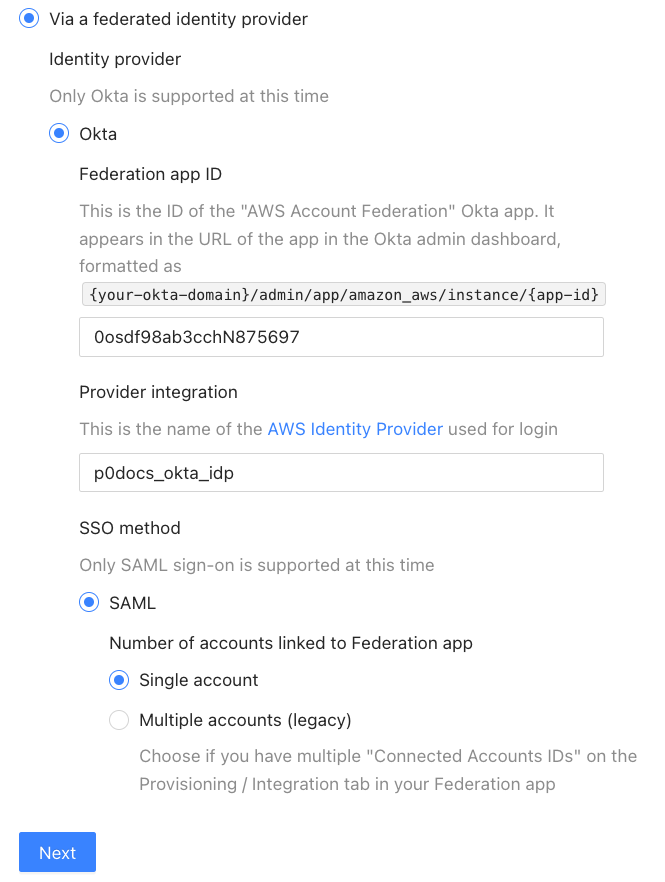
On the AWS IAM management configuration page, select **Via a federated identity provider**. Saving the configuration by clicking **Next** automatically applies the following changes to your AWS Account Federation app:
* Adds a custom attribute `managedByP0` to your Okta app's user profile. This lets P0 clean up dynamically assigned users from your AWS SSO Okta app.
* Enables the [`Join all roles`](https://help.okta.com/en-us/content/topics/deploymentguides/aws/aws-configure-aws-app.htm) flag. This lets users assume AWS roles that P0 assigns directly to their Okta user.
{% hint style="warning" %}
When you edit or make changes to your role pool, always refresh your application data. Find this action by navigating to your Okta environment as a super admin.
See Okta's [Refresh application data](https://support.okta.com/help/s/article/Refresh-Application-Data-Functionality-and-Usage?language=en_US) guidance for details.
{% endhint %}
## Related
* [Requesting AWS access](/integrations/resource-integrations/aws/requesting-access.md)
* [p0 aws role assume](/p0-cli/p0-commands-and-usage/p0-aws-role-assume.md)
* [Setting up AWS IAM management](/integrations/resource-integrations/aws/installation-methods.md)
 See Okta's [Refresh application data](https://support.okta.com/help/s/article/Refresh-Application-Data-Functionality-and-Usage?language=en_US) guidance for details.
{% endhint %}
## Related
* [Requesting AWS access](/integrations/resource-integrations/aws/requesting-access.md)
* [p0 aws role assume](/p0-cli/p0-commands-and-usage/p0-aws-role-assume.md)
* [Setting up AWS IAM management](/integrations/resource-integrations/aws/installation-methods.md)
See Okta's [Refresh application data](https://support.okta.com/help/s/article/Refresh-Application-Data-Functionality-and-Usage?language=en_US) guidance for details.
{% endhint %}
## Related
* [Requesting AWS access](/integrations/resource-integrations/aws/requesting-access.md)
* [p0 aws role assume](/p0-cli/p0-commands-and-usage/p0-aws-role-assume.md)
* [Setting up AWS IAM management](/integrations/resource-integrations/aws/installation-methods.md)